
Electrical report organisation
Make EICR board and circuit references easy to follow.
Use consistent references for each distribution board and circuit throughout the report. The customer should be able to follow an observation to the relevant schedule without guessing which board, area or circuit you mean.
Published by CertifyApps on . All document guides.
Start with the scope and installation identity.
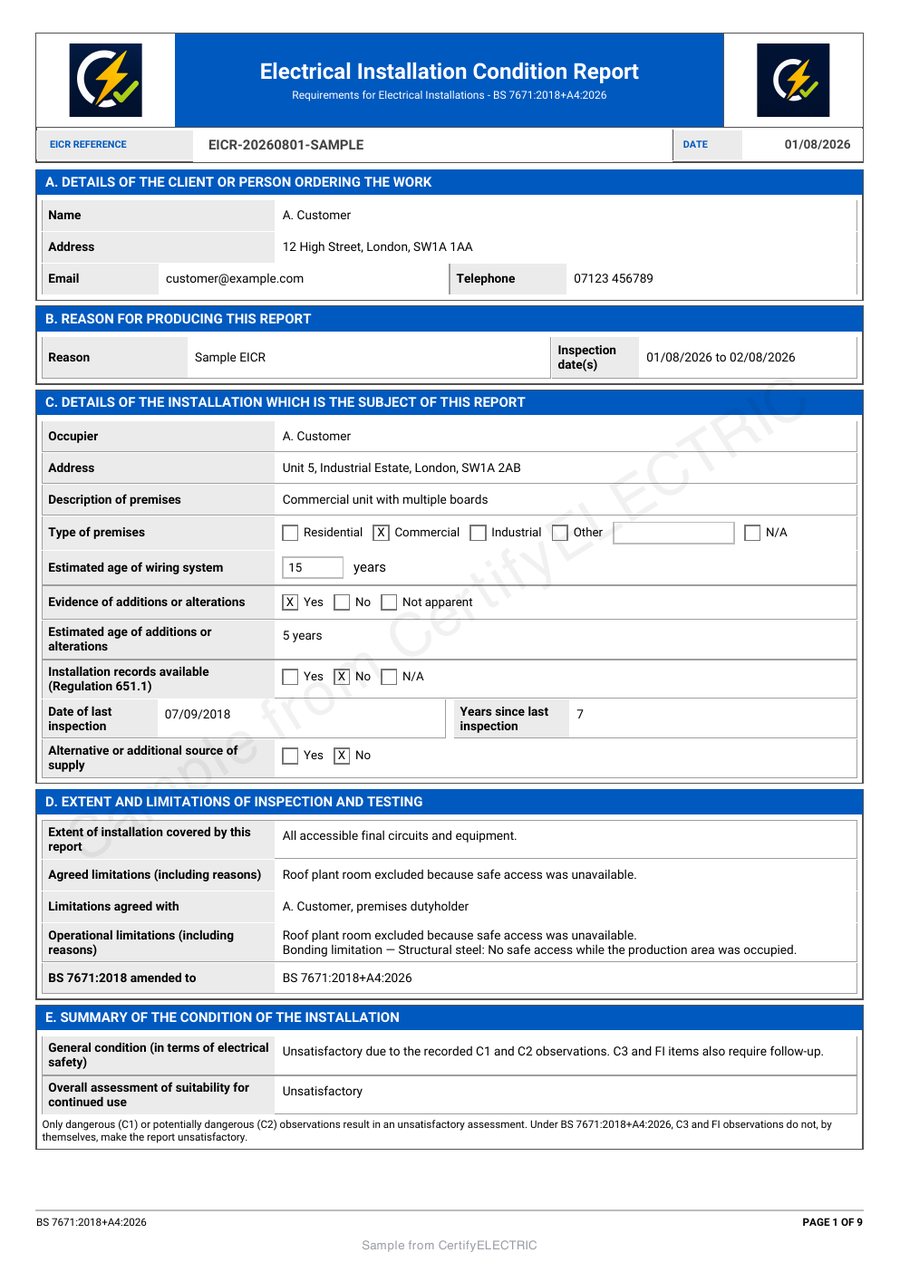
Confirm the client, installation address and extent of the report before filling schedules. A premises may contain several boards or areas, and the report needs to make its actual coverage understandable.
Electrical Safety First explains the purpose of periodic inspection and an EICR, including reporting observed defects and providing circuit information. This guide addresses clear document references; it is not a method for carrying out inspection, assigning codes or deciding whether an installation is safe.
Inspect the CertifyELECTRIC sample PDF.
Review the full EICR report, not just its first page. The sample shows example company branding and an app-specific watermark.
Company logos and available colour controls help make your own documents recognisable. Check the options for your app, document and plan.
Give every board a distinct, recognisable reference.
For a fictional demonstration, a business might distinguish DB1 – ground-floor intake from DB2 – first-floor office. Use references appropriate to the actual installation and check them against its identification. The examples here are labels, not a proposed design.
Avoid silently changing a board name midway through a report. If the reference needs correction, review its appearances in schedules and observations so the PDF does not contain two names for the same board or one name for two different boards.
Keep circuit descriptions useful beyond today's visit.
A circuit number without a board reference can be ambiguous when a report has multiple schedules. Use the report’s fields to associate each circuit with the correct board and give a description that helps identify its purpose or location.
- Check duplicate or missing references before export.
- Review longer descriptions in the finished schedule.
- Keep observations associated with the location or equipment concerned.
- Make limitations and unavailable information explicit through the appropriate report fields.
Do not fill a missing measurement with an assumed value to make a table look complete.
Review the whole report, including the schedules.
A tidy first page is only part of the customer handover. Open the full PDF and follow the board references across the report. Check that every intended schedule is present, that observations are readable and that the issued document reflects the inspector’s actual findings.
During evaluation, use more than one board, a longer circuit description and a multi-page schedule. Those examples expose layout and navigation questions that a mostly empty demonstration can miss. Compare how the app handles your required report type, device and correction process before choosing a plan.
Keep your branding separate from the assessment outcome.
Your company logo, contact information and available colour choices can make the PDF recognisable. They must not obscure observations, schedules or the report outcome. Check the branding guide alongside the actual sample.
CertifyELECTRIC is the electrical product in the family. Review its EICR workflow and the handover checklist. Your customer can receive the PDF without an app subscription.
Before you choose
Why include both a board and a circuit reference?
Circuit numbering may repeat across boards. A clear board reference helps the reader identify which schedule and part of the installation a circuit or observation concerns.
Does a clean PDF make an EICR satisfactory?
No. The outcome must reflect the competent inspector's actual findings. Layout, branding and software do not determine electrical safety.
Should I check more than the first page of a sample?
Yes. Review the observations, board references and complete schedules, especially longer entries and page breaks.
Can one sample prove every electrical document is supported?
No. Confirm the exact report or certificate, device and plan required for your work.
Choose the app for your professional work.
Review CertifyELECTRIC plans, explore free starter or ask about an essential document or device requirement. Direct registration and purchase links are not yet active on this website; the enquiry route does not start a paid subscription.
For software support, email [email protected]. For findings or safety questions about an issued record, contact the professional who carried out the work.
Start with your trade app
CertifyELECTRIC
Direct link coming soon
Need access or plan information now? Request help from the team.