
Electrical reports for working electricians
CertifyELECTRIC
Bring the installation details, observations and circuit schedules into a professional customer document. CertifyELECTRIC is for electricians who need the report to be as organised as the work behind it.
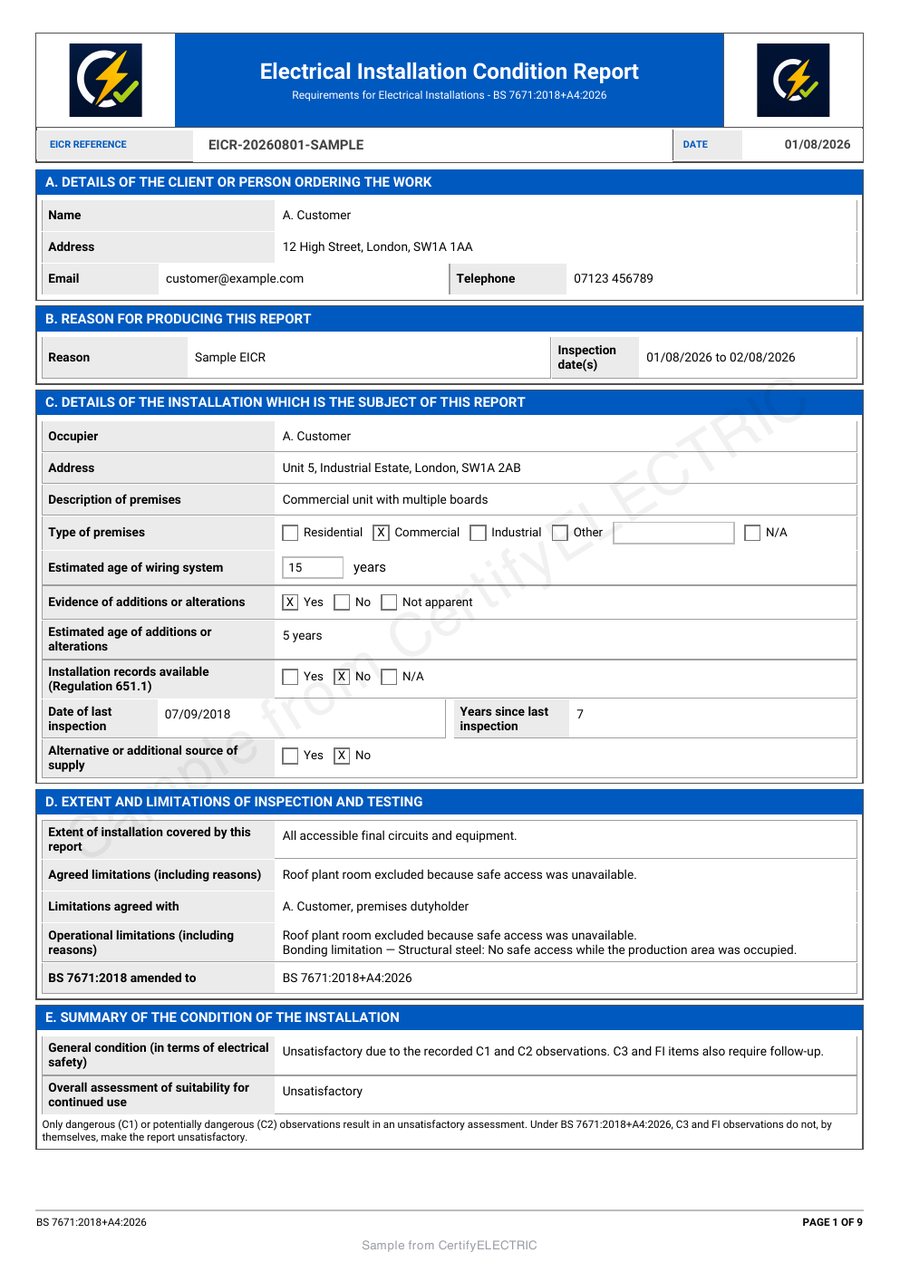
Look beyond the cover page of the EICR
Open the full existing EICR sample and follow the installation details, observations, board references and schedules. The coloured headings and example logos show one branded document style.
Make the document work for your business
Keep the installation identifiable
Connect the client, installation address and report scope so the recipient knows which work and premises the document covers.
Make schedules easier to follow
Keep board and circuit references consistent with the observations. A readable schedule helps the customer and the next professional locate the recorded information.
Send a complete professional report
Review the findings and the detailed pages together, then produce a customer PDF with the company branding available to your plan.
EICR, EIC or Minor Works: start with the right document
CertifyELECTRIC’s core electrical documents include the Electrical Installation Condition Report, Electrical Installation Certificate and Minor Electrical Installation Works Certificate.
They serve different recording purposes. Choose the document appropriate to the actual work instead of trying to turn a familiar form into something else. The public EICR sample demonstrates that report, not every electrical certificate or specialist workflow.
Explore the EICR report workflow. Confirm any specialist document requirement when requesting access.
Keep the report together from setup to issue
- Set the installation and scope
Confirm the client, address, report purpose and the extent of the work being recorded.
- Complete the observations and schedules
Record current findings and results against the relevant boards and circuits. Make limitations and unavailable information explicit.
- Review the entire PDF
Check long descriptions, observation references, continuation pages and declarations before issuing the document.
The electrician provides the assessment and signs for the recorded work. Software, branding and a complete-looking table do not establish a satisfactory installation.
Try the details that usually slow down reporting
For an evaluation, use a fictional installation with two boards, repeated circuit numbers under different board references and a longer observation. Follow the references through the exported PDF rather than checking only the first page.
Review the guide to EICR board and circuit schedules and the customer-ready PDF checklist.
Customers can receive and keep the electrical PDF without buying an app account. For several electricians, confirm the current user and plan arrangements before deciding.
Your company, your document style
Your company logo and contact details should help identify the issuer without competing with the assessment outcome or schedules. Review the available colour and branding controls for the chosen document and plan, including how longer information appears in the export.
Use only company, scheme or accreditation marks you are entitled to display. A professional layout is not an independent endorsement of the work.
Explore the branding guide or compare sample PDFs across the family.
Before you choose
Is an EICR the same document as an EIC?
No. They are distinct electrical documents for different work. CertifyELECTRIC includes separate core workflows for EICRs, Electrical Installation Certificates and Minor Electrical Installation Works Certificates. Select the appropriate document for the actual job.
Does the sample demonstrate every electrical report?
No. The public example is an EICR. Ask about the exact specialist document you need and evaluate that workflow in the version and plan you intend to use.
What should I inspect in a longer EICR sample?
Review the observations, board and circuit references, complete schedules, continuation pages and sign-off. Check that information remains readable and connected across the report.
Does the app decide whether an installation is satisfactory?
The competent electrician remains responsible for the inspection, recorded findings, classification and assessment. The software supports recording and document production; it is not an independent inspection or approval body.
What does the CertifyELECTRIC Free starter include?
The Free starter offer covers all seven Certify apps. Confirm the current CertifyELECTRIC document allowance, device availability and included features through its access or pricing route. Prices and limits published for CertifyPAT do not automatically apply to this app.
Does requesting access create an account or start a subscription?
No. The website route sends an enquiry. Direct signup and checkout destinations are not connected yet. The team can provide relevant access and plan information; you should review the actual purchase terms before subscribing.
Try the document your working day depends on
Request CertifyELECTRIC access and tell us about EICRs, installation certificates, Minor Works or a specialist report. Include your device and the number of professionals who will create records so the team can confirm the relevant access and plan details.
This sends an enquiry, not a registration or payment. You can also email [email protected].
Work across several trades? Compare all seven Certify apps or discuss your professional team. Confirm the products and user arrangements you need; do not assume one plan includes the entire family.
Start with CertifyELECTRIC
CertifyELECTRIC
Direct link coming soon
Need access or plan information now? Request help from the team.