
Emergency lighting records for engineers
CertifyLIGHT
Keep the site, lighting equipment and current visit findings connected. CertifyLIGHT helps emergency lighting engineers prepare professional inspection, testing and completion documents for their customers.
Inspect the schedule as well as the first page
Open the existing emergency lighting sample and review the site details, inspection information and schedules. Look at how the document identifies the work and presents the engineer's recorded results.
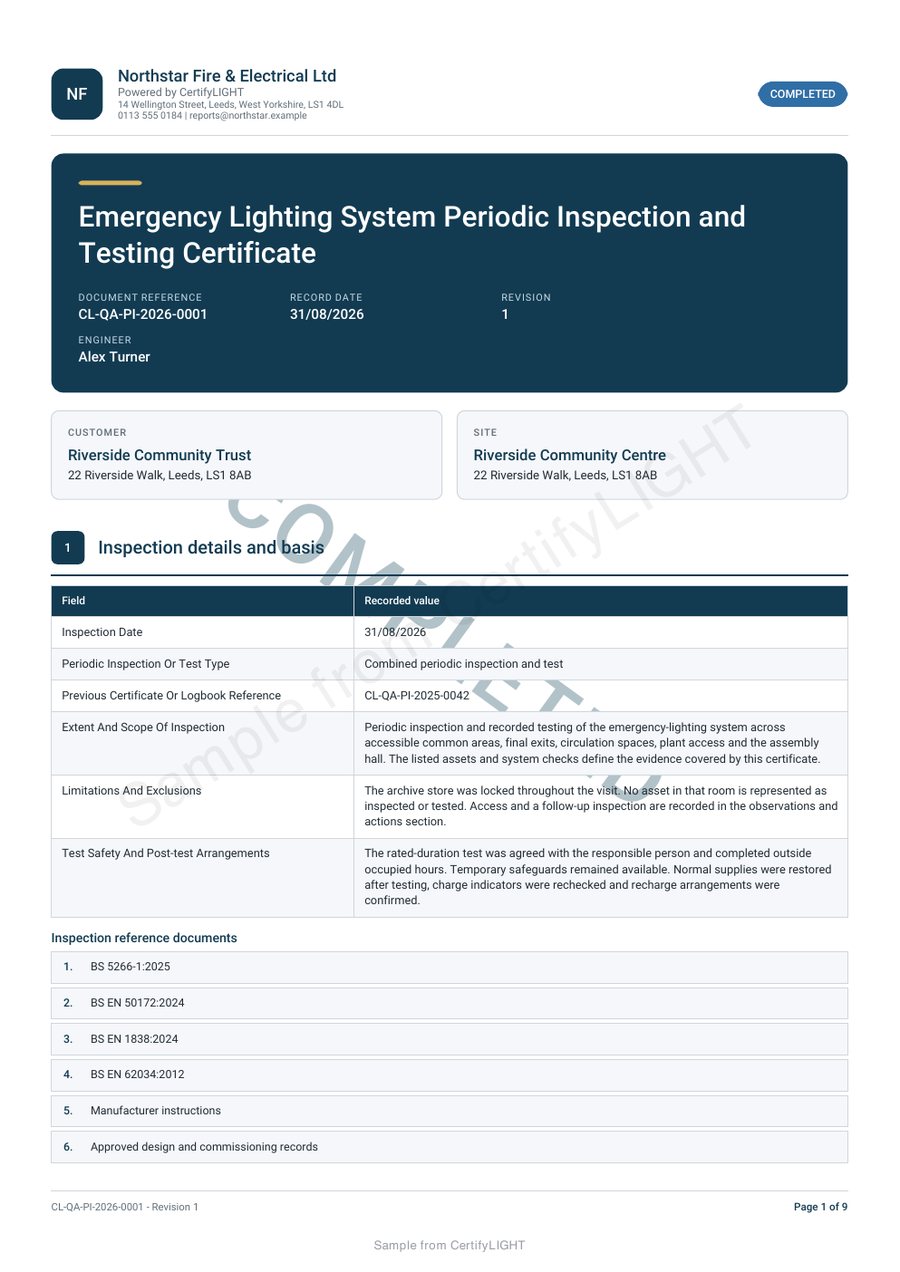
Make the document work for your business
Identify the equipment clearly
Use recognisable location and equipment references so a building team can follow the schedule after the engineer has left.
Keep each visit's findings distinct
An equipment identity can carry forward; a current result must reflect the actual visit. Keep that distinction clear in the document.
Hand over a professional record
Bring the relevant schedule and sign-off into a customer PDF, with company branding available for the selected document and plan.
A document for the stage of lighting work
Periodic inspection and testing, installation completion, existing-installation verification and service work have different recording purposes. CertifyLIGHT organises the work around the selected certificate or report.
Start with the document you actually issue and confirm its scope, version and plan availability. A periodic inspection sample should not be treated as proof of a full-system completion or specialist verification workflow.
From the location reference to the finished schedule
- Confirm the site and equipment
Use clear references for the installation and relevant luminaires, locations or areas.
- Record the work actually carried out
Complete the applicable fields with current results and findings. Identify limitations or unavailable information through the appropriate record fields.
- Review the report as a whole
Check the schedule, notes, outcomes and sign-off before sending the final PDF.
An asset list is not evidence of a completed test. The engineer remains responsible for the work, test method and recorded conclusions.
Try a multi-location schedule before choosing
Use a fictional building with two floors, a longer equipment location and enough entries to continue over a page. Check that references and findings stay readable throughout the export.
The emergency lighting asset guide helps distinguish equipment identity, a particular visit and later replacement information.
Your customer or building manager can receive the PDF without an app subscription. An organisation’s in-house engineers can evaluate the app as the people actually creating the records.
Your company, your document style
Use company information and the supported logo and colour settings to make the document recognisable. Keep the equipment schedule easy to read, including long location names and continuation pages. Controls vary by document and plan.
Use only company, scheme or accreditation marks you are entitled to display. A professional layout is not an independent endorsement of the work.
Explore the branding guide or compare sample PDFs across the family.
Before you choose
Is an equipment list the same as a lighting test report?
No. An equipment list identifies what is present. A test or inspection record describes the particular work and findings. The current report must reflect what was actually carried out.
Does the sample show every lighting certificate?
No. It is one exported example. Confirm the exact periodic inspection, completion, verification or service document you need in the app version and plan being evaluated.
Can a previous satisfactory result be reused for the next visit?
Do not treat a previous result as evidence of new work. Equipment and location details may remain useful, but the engineer must record the current findings and appropriate sign-off.
Does this page specify emergency lighting test intervals?
No. It explains document organisation and product evaluation. The professional must use the requirements and technical information appropriate to the actual installation and work.
What does the CertifyLIGHT Free starter include?
The Free starter offer covers all seven Certify apps. Confirm the current CertifyLIGHT document allowance, device availability and included features through its access or pricing route. Prices and limits published for CertifyPAT do not automatically apply to this app.
Does requesting access create an account or start a subscription?
No. The website route sends an enquiry. Direct signup and checkout destinations are not connected yet. The team can provide relevant access and plan information; you should review the actual purchase terms before subscribing.
Try the document your working day depends on
Request CertifyLIGHT access and tell us about periodic inspections, completion certificates, verification or service reports. Include your device and the number of professionals who will create records so the team can confirm the relevant access and plan details.
This sends an enquiry, not a registration or payment. You can also email [email protected].
Work across several trades? Compare all seven Certify apps or discuss your professional team. Confirm the products and user arrangements you need; do not assume one plan includes the entire family.
Start with CertifyLIGHT
CertifyLIGHT
Direct link coming soon
Need access or plan information now? Request help from the team.