
Fire alarm documents for specialist engineers
CertifyAlarm
Make the certificate match the alarm-system work. CertifyAlarm helps specialist engineers organise the system details, document scope and sign-off in professional PDFs for the customer handover.
See a verification certificate from the app
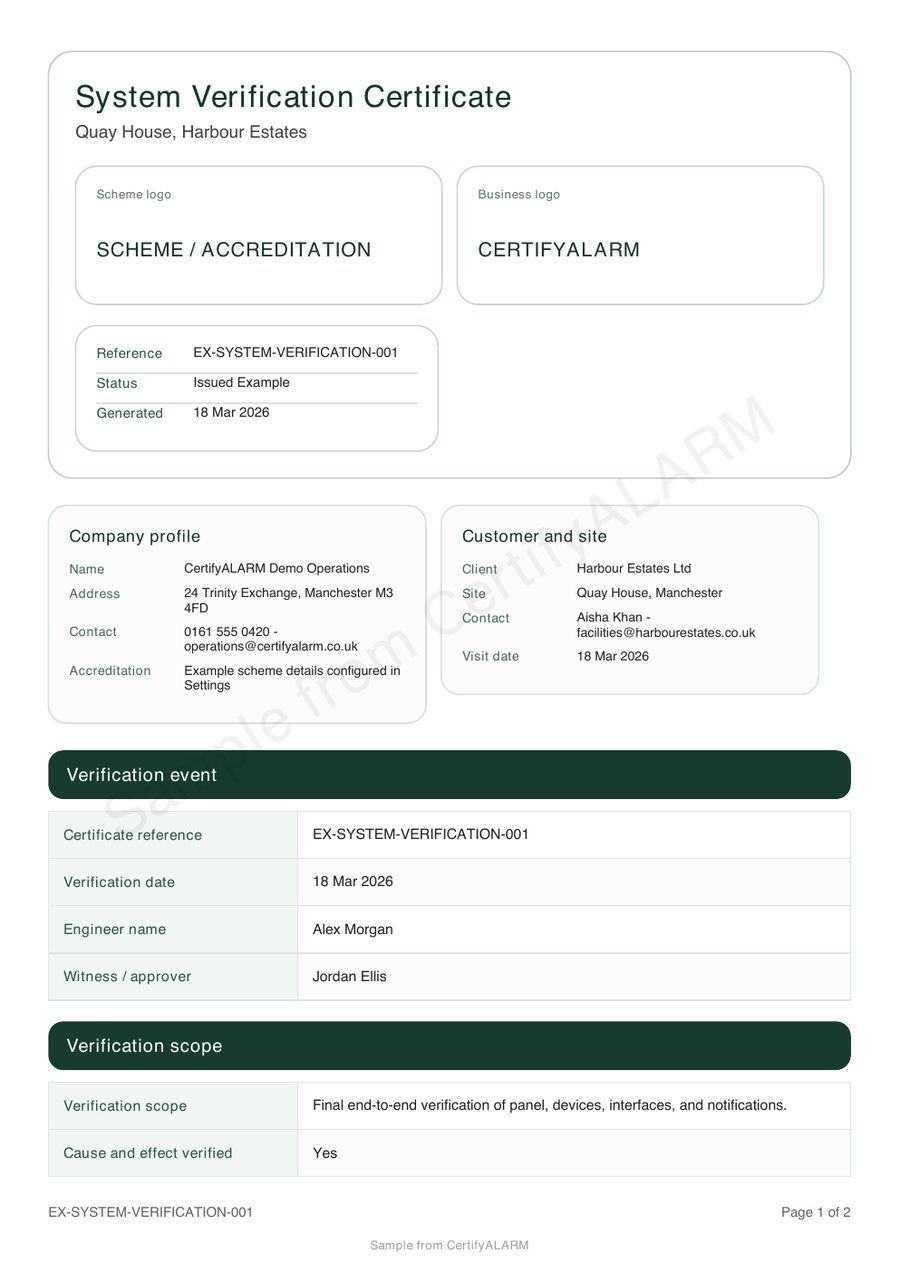
Inspect the existing verification sample, including the company, customer and system information, declared scope and signatures. It demonstrates one document type, not every fire alarm form.
Make the document work for your business
Keep the document purpose clear
Distinguish verification, installation, inspection and servicing work rather than expecting one generic certificate to describe every visit.
Identify the right system
Keep the premises and system references together so the recipient can understand which building, system or area the document concerns.
Make handover consistent
Present the recorded scope and sign-off under the issuing company's identity, with the branding controls available to the selected document and plan.
Choose by system and work stage
CertifyAlarm’s document catalogue distinguishes verification, design/installation/commissioning, testing and maintenance, inspection/servicing and acceptance records. Their purposes and system scopes are not interchangeable.
When requesting access, describe the system and the work stage, then confirm the exact template in the version and plan you will use. The public verification sample alone does not prove that a different service or system document meets your requirement.
For wider fire risk assessment and inspection reporting, compare CertifyFIRE.
From system identity to accountable sign-off
- Identify the premises and system
Confirm the system reference, relevant areas and the purpose of the document.
- Record the defined work and findings
Complete the selected document with the current evidence and make outstanding matters or limitations clear.
- Review each declaration and the PDF
Check that the named people, responsibilities and sign-off relate to the work they actually carried out before handover.
A new certificate does not automatically resolve earlier faults or replace every document in the site’s alarm record set.
Test a real-world handover scenario
For a demonstration, use a fictional main building and annex with distinct references and a longer system note. Check that the exported document makes its coverage and purpose understandable.
Use the fire alarm document handover guide to review system references, document selection and the issued version.
The engineer creates the record. The premises contact or customer can receive and keep the PDF without subscribing to CertifyAlarm.
Your company, your document style
Company logos, contact information and available colours can give your alarm documents a consistent business identity. Keep them separate from the technical scope and professional declarations. Check the exact controls for the document and plan before adopting a style.
Use only company, scheme or accreditation marks you are entitled to display. A professional layout is not an independent endorsement of the work.
Explore the branding guide or compare sample PDFs across the family.
Before you choose
Is a verification certificate the same as a service record?
No. The purpose and system scope of the selected document must match the work. Inspect the particular workflow you require rather than assuming one alarm sample demonstrates every other form.
Can the app document work on different alarm systems?
The catalogue separates documents by purpose and system scope. Tell the team which system and work stage you need and confirm the appropriate template in your intended version and plan before choosing.
Does a new certificate close all faults in the site log?
No. It records the stated work and scope. A claim that an earlier fault has been resolved needs appropriate evidence from the actual work or follow-up process.
Should I use CertifyAlarm for a fire risk assessment?
Compare CertifyFIRE for fire risk assessment reporting. CertifyAlarm is the specialist alarm-document product. Choose based on the exact document you need to create.
What does the CertifyAlarm Free starter include?
The Free starter offer covers all seven Certify apps. Confirm the current CertifyAlarm document allowance, device availability and included features through its access or pricing route. Prices and limits published for CertifyPAT do not automatically apply to this app.
Does requesting access create an account or start a subscription?
No. The website route sends an enquiry. Direct signup and checkout destinations are not connected yet. The team can provide relevant access and plan information; you should review the actual purchase terms before subscribing.
Try the document your working day depends on
Request CertifyAlarm access and tell us about the alarm system type and verification, installation or service work. Include your device and the number of professionals who will create records so the team can confirm the relevant access and plan details.
This sends an enquiry, not a registration or payment. You can also email [email protected].
Work across several trades? Compare all seven Certify apps or discuss your professional team. Confirm the products and user arrangements you need; do not assume one plan includes the entire family.
Start with CertifyAlarm
CertifyAlarm
Direct link coming soon
Need access or plan information now? Request help from the team.