
Gas engineer document guide
Keep the customer, property and appliances clear on a gas record.
Separate the person instructing the job from the address where the work takes place. Then identify each appliance clearly, record the current visit and review the complete PDF before sending it to the agreed recipient.
Published by CertifyApps on . All document guides.
What information belongs to the customer and what belongs to the site?
The instructing customer may be a landlord or agent, while the work address is a particular flat or house. Keep those details distinct. A billing address is not automatically the inspected property, and an occupier’s name does not automatically identify the landlord.
HSE’s gas safety record guidance sets out the minimum record information, including the property and landlord or agent details, the appliances or flues checked, engineer identification, date, defects and remedial action. Use that guidance for the full requirements; the steps below focus on document organisation.
Inspect the CertifyGAS sample PDF.
Review the full Landlord Gas Safety Record, not just its first page. The sample shows example company branding and an app-specific watermark.
Company logos and available colour controls help make your own documents recognisable. Check the options for your app, document and plan.
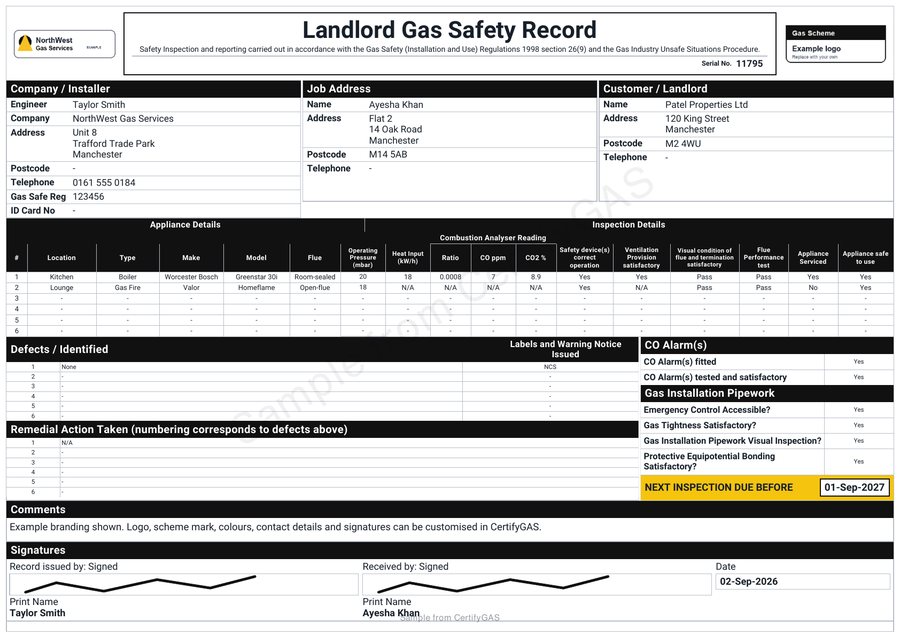
Use a consistent reference for each appliance.
A description should help the recipient distinguish one item from another. For example, a demonstration job might identify a boiler in the kitchen and a separate appliance in the lounge. Those are fictional location examples, not inspection results.
- Check that the location, appliance description and identifying details refer to the same item.
- Keep an observation associated with the appliance it concerns.
- Where an item or location has changed, record the current information rather than retaining an outdated description.
- Review longer descriptions in the exported table so important words are not hidden or cut off.
Reuse identity details, not the previous visit's conclusions.
Saved customer and site information can be a useful starting point where the app supports it. Check it against the current instruction. Dates, findings, measured results, signatures and the record reference must relate to the work actually being documented.
For a software evaluation, try a sample customer with a separate property address and more than one appliance. Review how easily you can correct an address and follow an appliance reference through the finished PDF. Keep test data separate from real issued records.
Check the document the customer will actually receive.
- Identify the job.
Confirm the complete work address, customer details and current record reference.
- Read the appliance table.
Check that each row is associated with the right item and that notes remain readable.
- Review the issued information.
Check the recorded findings, actions and sign-off without treating an empty field as a satisfactory result.
- Confirm the recipient.
Send the reviewed version through the agreed handover process and retain it in your business records.
Present the record as part of your business.
Company contact details and a recognisable logo help the customer identify the issuing business. The public CertifyGAS sample uses a black theme and example logos. Available branding and colour controls depend on the document and plan.
Explore CertifyGAS and the gas safety record workflow. For the wider handover, use the customer-ready PDF checklist. Landlords and agents can receive the completed PDF without subscribing; the app is for the professional creating it.
Before you choose
Are the customer address and property address always the same?
No. A landlord or agent may instruct work at a different address. Check the customer information and the actual work location separately.
Can I carry last year's results into a new gas safety record?
Do not treat previous results, conclusions, dates or signatures as evidence of the current visit. The professional must record the actual work and findings for the new record.
Does the landlord need a CertifyGAS subscription?
Not simply to receive the finished PDF. The professional creates and issues the document; the landlord or agent can receive and retain it.
Can I use the sample PDF for a real property?
No. The watermarked sample contains example information and is only for evaluating the document output.
Choose the app for your professional work.
Review CertifyGAS plans, explore free starter or ask about an essential document or device requirement. Direct registration and purchase links are not yet active on this website; the enquiry route does not start a paid subscription.
For software support, email [email protected]. For findings or safety questions about an issued record, contact the professional who carried out the work.
Start with your trade app
CertifyGAS
Direct link coming soon
Need access or plan information now? Request help from the team.