
Heat pump records for professional installers
CertifyECO
Bring the equipment, installation checks and handover information into a structured record of your work. CertifyECO helps heat pump professionals produce clear customer documents with less manual layout work.
Inspect the installation record within the handover
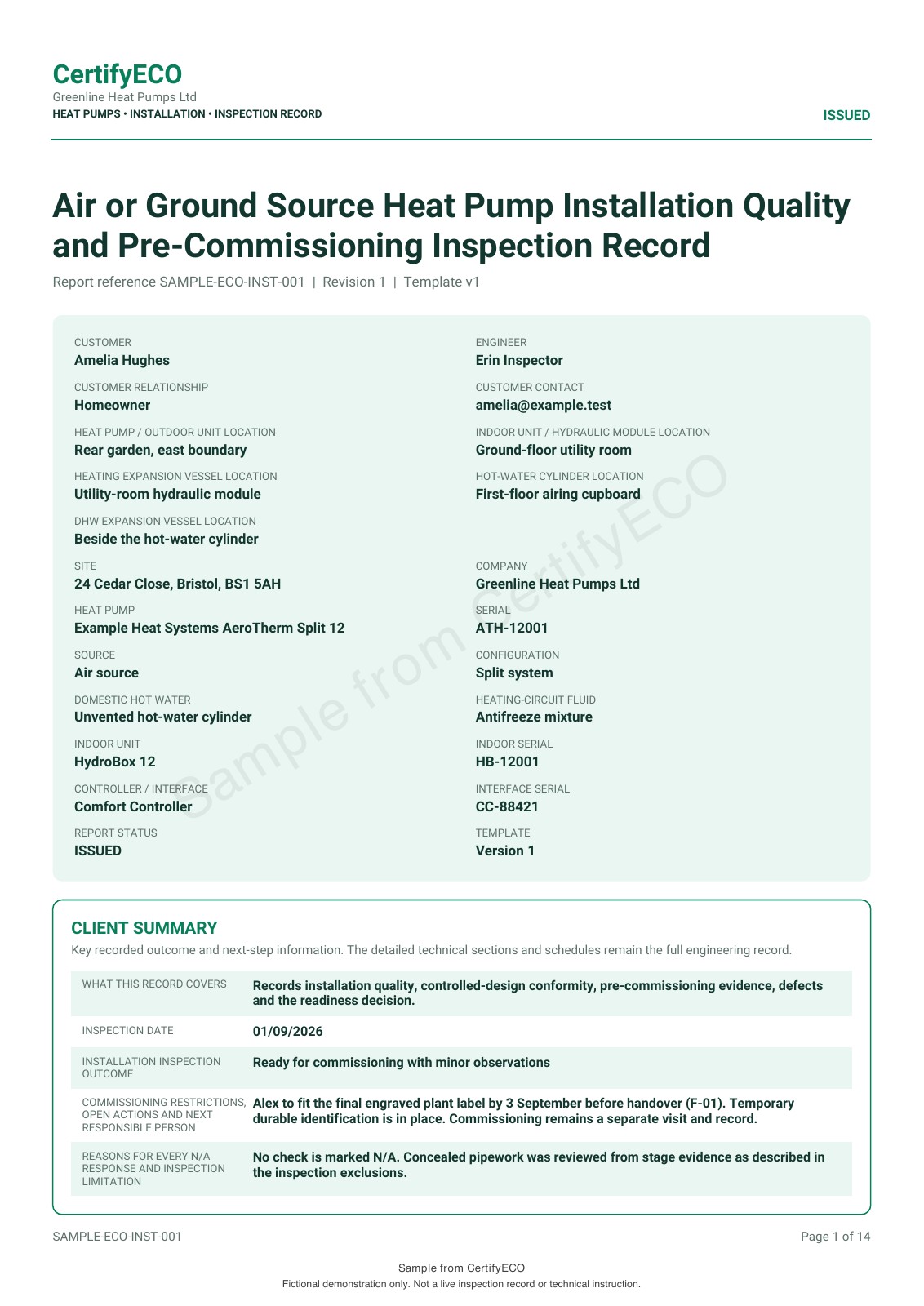
Open the existing heat pump installation sample to review the equipment details, installation information, evidence and handover sections. It is an example record, not the complete documentation pack for every installation.
Make the document work for your business
Identify the installed equipment
Keep the customer, installation address and equipment references connected so the record relates to the actual system rather than a generic product.
Organise the recorded work
Bring the relevant checks, evidence and professional declarations into the chosen record without creating a new document layout for each job.
Give the customer a clear handover record
Issue a professional PDF under your company's identity and keep its role clear alongside manuals, warranties and separately supplied documents.
Start with the heat pump work you need to record
Installation, commissioning, maintenance and later remedial work have different evidence and handover needs. Begin with the actual work stage and confirm the document you need in the app version and plan being evaluated.
The public sample shows an installation record. Do not assume it demonstrates every design, performance, commissioning or service workflow, or software for every renewable technology.
For separate electrical reports, compare CertifyELECTRIC and confirm the electrical document required.
From equipment details to customer records
- Identify the installation
Confirm the customer, property and equipment references so the record describes the correct system.
- Complete the current work record
Use the appropriate fields for the checks and evidence actually obtained. Keep limitations and outstanding information clear.
- Review the document and handover
Check the professional declarations and the full PDF, then identify which other documents accompany it or are being supplied separately.
The installer or engineer remains responsible for the work and information recorded. Producing a PDF is not a separate scheme registration or third-party approval.
Evaluate the record alongside your normal handover pack
Use a fictional customer and realistic equipment descriptions. Include the kind of longer notes and supporting references your jobs need, then inspect every relevant page of the exported record.
Use the heat pump handover pack guide to distinguish your installation record from design information, manufacturer manuals, warranty material and separate certification.
The homeowner or other customer can receive the PDF without subscribing. The app is for the professional creating the record, not a requirement placed on the recipient.
Your company, your document style
The refreshed ECO sample includes business details and the native green report style. It does not demonstrate custom company logos, scheme logos or editable colour controls. Confirm the available options for your document, app version and plan. Manufacturer documents and third-party certificates retain their own issuer and identity.
Use only company, scheme or accreditation marks you are entitled to display. A professional layout is not an independent endorsement of the work.
Explore the branding guide or compare sample PDFs across the family.
Before you choose
Is the sample a complete heat pump handover pack?
No. It is one installation record. The actual handover may also need design information, manufacturer instructions, warranty details and separately issued documentation.
Does exporting a CertifyECO record create an MCS certificate?
Do not assume that. The app-generated record is not a substitute for a separate scheme certificate or registration process. Confirm any claimed integration independently before relying on it.
Does this page demonstrate every renewable technology?
No. The evidence on this page is a heat pump installation sample. Name the technology and exact document you need rather than assuming that every renewable workflow is included.
Can I put my branding on the whole handover pack?
The ECO sample shows business details and green report styling, but does not demonstrate custom logos or editable colours. Confirm the controls available for your app version, document and plan. Third-party documents retain their original issuer and identity; one app-generated record does not replace them.
What does the CertifyECO Free starter include?
The Free starter offer covers all seven Certify apps. Confirm the current CertifyECO document allowance, device availability and included features through its access or pricing route. Prices and limits published for CertifyPAT do not automatically apply to this app.
Does requesting access create an account or start a subscription?
No. The website route sends an enquiry. Direct signup and checkout destinations are not connected yet. The team can provide relevant access and plan information; you should review the actual purchase terms before subscribing.
Try the document your working day depends on
Request CertifyECO access and tell us about the heat pump type, work stage and installation or service record required. Include your device and the number of professionals who will create records so the team can confirm the relevant access and plan details.
This sends an enquiry, not a registration or payment. You can also email [email protected].
Work across several trades? Compare all seven Certify apps or discuss your professional team. Confirm the products and user arrangements you need; do not assume one plan includes the entire family.
Start with CertifyECO
CertifyECO
Direct link coming soon
Need access or plan information now? Request help from the team.