
CertifyECO sample PDF
Sample heat pump installation record
See how CertifyECO presents the inspection outcome, equipment details and next actions in a professional, structured PDF. Review the finished record before choosing software for your heat-pump business.
Free to view, with no email required. Generated on 7 September 2026 using the CertifyECO PDF renderer and fictional demonstration data.
A clearer record of what was checked
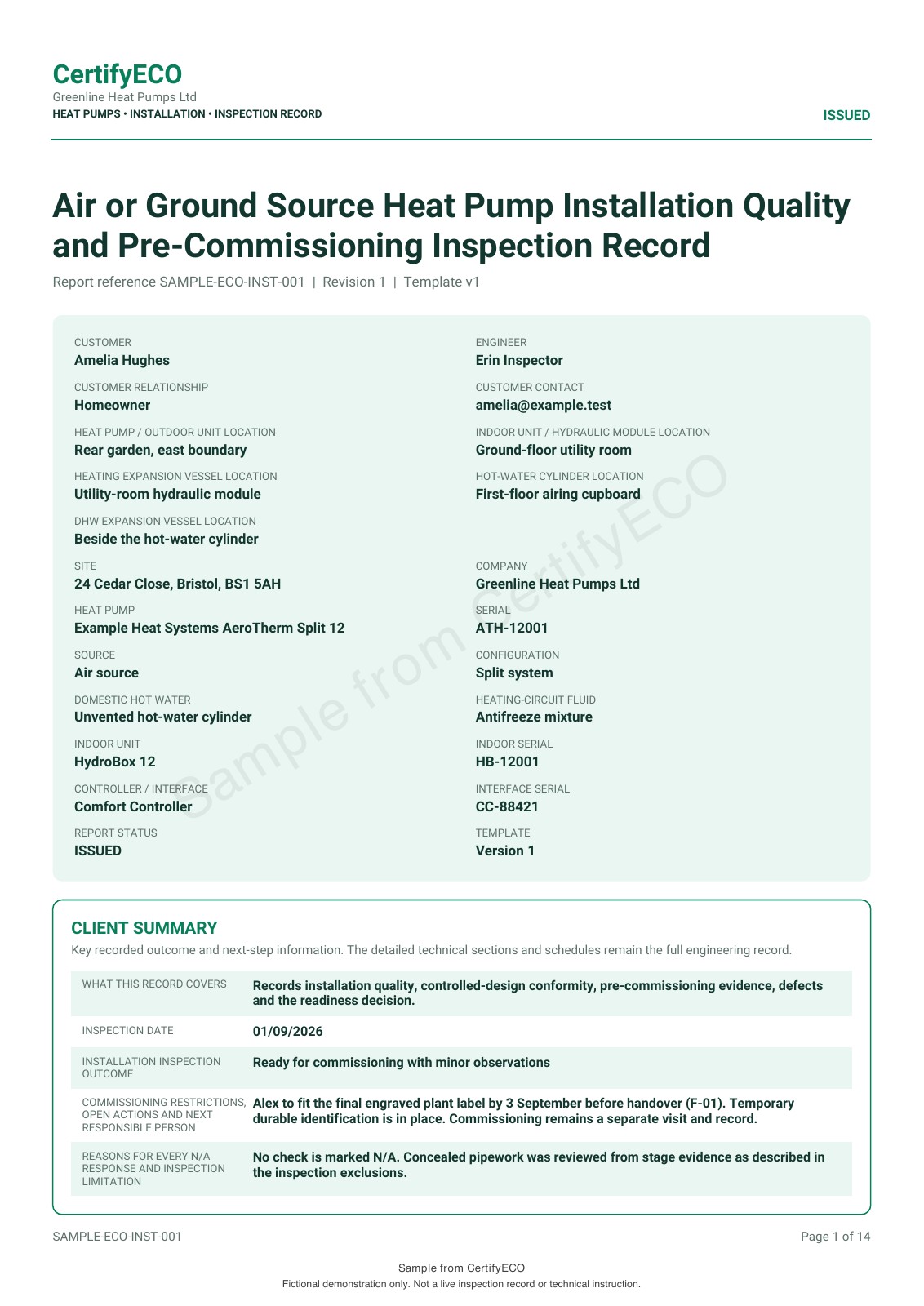
- Give the customer a useful summary. The first page identifies the equipment, inspection outcome and next responsible person.
- Keep the technical detail traceable. Inspection checks connect to component, test, evidence and defect schedules.
- Make outstanding work explicit. This example records a minor labelling action with an owner and target date, rather than hiding it in a general comment.
- Show who took responsibility. Issuer details and role-specific declaration areas sit alongside the inspection record.
This example covers an air-source split heat-pump installation with stored hot water. It is for engineers and installation businesses carrying out the work. Customers and property owners receive the resulting PDF; they do not need an app subscription just to read it.
Professional presentation, with honest expectations
The sample uses CertifyECO’s green report styling and includes the demonstration business name, contact details and signature areas. It shows the layout produced by the app’s PDF renderer, not a separately designed certificate.
This export does not demonstrate a custom company logo, scheme logo or user-selectable report colours. Check the branding options available for your exact app version, document and plan before subscribing. Our guide to logos and colours across CertifyApps explains what to check.
This is an independent installation quality and pre-commissioning inspection record. It is not an official MCS certificate, electrical certificate, refrigerant record or completed commissioning and handover pack. All example people, equipment, signatures and evidence references are fictional. Referenced supporting files are not included, and sample values must not be used as test instructions.
Check the CertifyECO plans, Free starter guide and heat-pump handover guide alongside the sample.
CertifyECO sample questions
Is this PDF generated by CertifyECO?
Yes. This sample was generated on 7 September 2026 using the CertifyECO PDF renderer with fictional demonstration data. Only the public sample watermark was added afterwards. It demonstrates that renderer’s output, not a verified export from every released app version or device.
What does the heat-pump sample cover?
It shows installation quality and pre-commissioning inspection for an example air-source split system with stored hot water. It includes customer and equipment details, a client summary, inspection checks, evidence references, declarations and schedules. Commissioning performance readings and final customer handover are outside this record.
Can I add my logo or change the report colours?
This sample shows the green CertifyECO report style and business details. It does not demonstrate custom company logos, scheme logos or editable colour controls. Ask the team to confirm the branding options available for your document, app version and plan before subscribing.
Is this an official MCS installation certificate?
No. This is an independent engineer inspection record, not an official MCS installation certificate or a substitute for separate electrical, refrigerant, commissioning or other required documents. It does not grant scheme membership or demonstrate a real installation’s compliance.
Does my customer need a CertifyECO subscription?
No subscription is needed just to open a PDF sent by their engineer. CertifyECO is for the professionals producing the record. The customer can read the exported file in a PDF reader.
Can I try CertifyECO before subscribing?
You can request free starter access for CertifyECO. The team will confirm the access route and applicable limits for your device and plan. Direct self-service signup and checkout links are not active on this page yet.
More samples from the CertifyApps family
Choose the documents that match the work your business actually carries out.
Ask for CertifyECO free starter access
Tell us your device and the records you need to produce so the team can confirm the next step.
Need access or plan information now? Request help from the team.
Start with your trade app
CertifyECO